How to Set Up the Perfect Mobile Workspace in Your Van
Picture this: you are parked beside a glassy lake, laptop open, coffee steaming, and your morning calls done before most office workers have even found a parking spot. That is the dream of the modern mobile professional, and with the right setup, it is absolutely within reach. Whether you are a seasoned remote worker or just starting to explore van life, building a reliable, innovative mobile workspace is one of the smartest investments you can make in your productivity and freedom. The concept of tele savalis, working from wherever life takes you, is no longer a niche lifestyle. It is a growing movement backed by real results and premium planning.
According to a 2023 report by Buffer, 98% of remote workers say they would like to work remotely at least some of the time for the rest of their careers. A well-designed van workspace puts you at the heart of that revolution, on your own terms.
Let us walk through everything you need to build the perfect mobile office on wheels.
Why Van Life and Remote Work Are a Natural Match
The idea of merging travel with professional productivity is not new, but the tools available today make it more accessible than ever. High-speed mobile internet, compact premium hardware, and clever van conversion products have all matured to the point where you can genuinely replicate, and in some cases surpass, the comfort of a traditional office.
Remote workers who have embraced van conversions report higher job satisfaction, reduced commuting stress, and a stronger sense of personal autonomy. A study published by Stanford University found that remote workers are 13% more productive than their in-office counterparts, and that number climbs higher when the environment is purposefully designed for focus.
The key word there is purposefully. A van workspace that is thrown together will quickly become a source of frustration. But an innovative, well-thought-out setup? That becomes your competitive advantage.
Planning Your Van Workspace: Where to Start
Define Your Work Style First
Before you buy a single piece of gear or screw in a single bracket, spend time thinking honestly about how you work:
- Do you spend most of your day on video calls?
- Do you need multiple monitors or just a single laptop?
- Are you creative and need space to sketch, draw, or spread out physical materials?
- Do you work traditional business hours, or are you more flexible?
Your answers will shape every decision that follows. A video content creator has entirely different needs from a software developer or a financial consultant. Getting clear on your use case means you will not spend money on gear that does not serve you.
Measure Your Van’s Interior Carefully
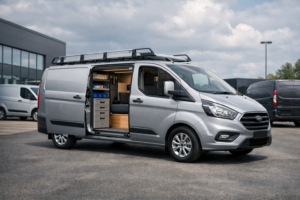
The most common mistake people make is designing a workspace based on inspiration photos without accounting for the actual dimensions of their specific van. Popular van choices for mobile workspaces include:
- Mercedes Sprinter (high roof models offer generous headroom)
- Ford Transit (widely available with strong aftermarket support)
- Volkswagen Crafter (premium build quality with a refined feel)
- Ram ProMaster (front-wheel drive, excellent interior width)
Measure your usable floor space, ceiling height at the intended desk location, and the width available for your primary workstation before purchasing any furniture or mounting systems.
Building the Core Workstation
Choosing the Right Desk Setup
Your desk is the foundation of everything. In a van, you have several reliable options:
- Fixed built-in desk: Permanently mounted, usually against the side wall or across the rear. Offers the most stability and the cleanest cable management. Ideal if you plan to work from the van full-time.
- Fold-down desk: Mounts to the wall and folds flat when not in use. Excellent for vans that double as sleeping spaces. Many premium fold-down systems can support a full monitor and dual laptop setup.
- Swivel seat setup: A popular and innovative approach where passenger or driver seats are swivelled to face the interior, with a surface that spans between them. Great for occasional use but limited for full-day work sessions.
- Bed-to-desk convertible: Some van builds incorporate a bench or platform that transitions between sleeping and working modes. These require careful engineering but deliver impressive versatility.
For most full-time remote workers, a fixed built-in desk made from lightweight but durable materials like birch plywood or aluminium composite panels offers the best combination of reliability and workspace quality.
Monitor and Display Considerations
Working from a single laptop screen all day is a reliable path to eye strain and reduced output. Upgrading your display situation is one of the highest-value changes you can make:
- Portable monitors: Lightweight USB-C powered options from brands like ASUS, LG, or Samsung are fantastic for van setups. They draw power from your laptop and weigh under one kilogram.
- Monitor arms: A premium articulating arm lets you position your screen precisely, then fold it away when driving. Look for van-specific mounting solutions that attach to your furniture frame rather than clamping onto a thin surface.
- Anti-glare screen protectors: Van windows let in a lot of natural light, which is wonderful for your mood and genuinely difficult for your screen visibility. A quality anti-glare film is inexpensive and makes a significant difference.
Ergonomics Are Non-Negotiable
Poor ergonomics will catch up with you. Back pain, wrist strain, and neck tension are common among van workers who have not taken seating and posture seriously.
Key ergonomic considerations for your van office:
- Your monitor top should sit at or just below eye level
- Your elbows should rest at approximately 90 degrees when typing
- Your feet should be flat on the floor or a footrest, not dangling
- Lumbar support is essential, especially on long work days
Investing in a premium compact office chair that can be bolted or secured safely for travel is worth every penny. Brands like HM (Herman Miller compact models) and Humanscale make smaller footprint options that suit van dimensions.
Power and Connectivity: The Lifeblood of Your Setup
Building a Reliable Power System
This is where many van workspace builds succeed or fail. A premium, properly sized power system gives you the freedom to work anywhere without anxiety about running out of juice.
The essentials of a solid van power system:
- Lithium Iron Phosphate (LiFePO4) batteries: These are the gold standard for van power. They are more expensive than AGM batteries but offer significantly more usable capacity, longer cycle life (often 3,000 to 5,000 cycles), and safer chemistry. A 200Ah to 300Ah bank suits most full-time remote workers.
- Solar panels: Roof-mounted solar is the most practical and innovative way to keep your batteries topped up without relying on shore power or running your engine. A 400W to 600W solar array paired with a quality MPPT charge controller handles the average remote worker’s needs in most climates.
- DC-to-DC charger: Also known as a B2B charger, this device intelligently charges your leisure batteries from your van’s alternator while driving. It protects your starter battery while ensuring your house bank gets a full, reliable charge.
- Inverter: For powering laptops, monitors, and any AC devices, a pure sine wave inverter of at least 1,000W is recommended. Pure sine wave is non-negotiable for sensitive electronics; modified sine wave inverters can damage premium equipment over time.
Approximate daily power consumption for a typical remote work setup:
| Device | Average Daily Consumption |
|---|---|
| Laptop (MacBook Pro) | 60-80Wh |
| External monitor (24″) | 50-70Wh |
| USB hub and peripherals | 10-20Wh |
| Phone charging | 15-25Wh |
| LED lighting | 10-20Wh |
| Wi-Fi router/hotspot | 15-30Wh |
| Total | 160-245Wh |
A 200Ah LiFePO4 battery at 80% usable capacity gives you approximately 1,920Wh, which means several days of comfortable work even without any solar input.
Staying Connected: Internet Solutions
Reliable internet is not optional. It is the single most critical tele savalis infrastructure requirement for any mobile professional. Here are the innovative, premium approaches that consistently deliver results:
1. Multi-SIM router: A router that accepts multiple SIM cards and bonds or switches between networks automatically. Devices like the Pepwave MAX BR1 Pro or Teltonika RUT series are trusted by van-working professionals worldwide.
2. Network aggregation: Advanced routers can combine multiple data connections simultaneously, effectively increasing your total bandwidth and eliminating dead spots in marginal coverage areas.
3. Signal boosters: A quality cellular signal booster from WeBoost or Surecall can meaningfully improve connection quality in rural or mountainous areas where signal is weak but present.
4. Starlink: SpaceX Starlink’s flat high performance antenna is increasingly common in van setups. It delivers genuine broadband speeds in locations where terrestrial networks struggle. The hardware cost is significant but for reliable full-time remote work, many professionals find it completely justified.
Best practice: Always carry at least two independent internet sources. Redundancy is reliability.
Climate Control and Acoustic Comfort
Temperature Management
Extreme temperatures are the enemy of both your equipment and your concentration. Your van workspace needs thoughtful climate management:
- Insulation: A well-insulated van dramatically reduces both summer heat and winter cold. Spray foam plus rigid foam board is the premium combination recommended by experienced van builders. Do not skimp here.
- Ventilation fans: A Maxxair or Fan-Tastic roof fan with a thermostat controller provides reliable airflow and passive cooling that can drop interior temperatures significantly.
- Diesel heater: A Chinese-manufactured unit (like Webasto alternatives such as the Vevor or Hcalory) or a genuine Webasto or Espar unit provides reliable, fuel-efficient heat during cold months without draining your batteries.
- Portable AC units: For very hot climates, a zero-breeze or similar 12V-compatible portable AC unit can be a genuine game changer, though power consumption requires careful battery bank planning.
Reducing Road and Ambient Noise
Acoustic comfort is often overlooked but profoundly important for video calls and focused work:
- Line walls and ceiling with mass loaded vinyl (MLV) beneath your wall panels to reduce road noise
- Use a quality USB microphone with cardioid pickup pattern to minimise background noise on calls
- Invest in noise-cancelling headphones for deep focus sessions; the Sony WH-1000XM5 and Bose QuietComfort Ultra are outstanding performers
Organisation, Cable Management, and Small Details That Matter
A premium workspace is not just functional; it is organised and pleasant to spend time in.
- Cable management channels: Run all cables along your furniture frame inside cable channels. Loose cables in a moving vehicle are a safety and frustration risk.
- Magnetic cable holders: Small neodymium magnets with cable clips keep your desk surface clean and cables accessible.
- Drawer organisers: Use drawer dividers for peripherals, cables, notebooks, and accessories. Everything should have a home.
- Lighting: A warm-to-cool temperature adjustable LED strip above your workstation improves both mood and video call appearance. Position it to avoid screen glare.
- Cup holder and anti-slip surfaces: Non-negotiable. A moving van means drinks and devices need to be secured.
FAQ
Q: How much does it cost to build a van workspace?
A: Costs vary widely depending on van choice and component quality. A reliable, functional setup typically ranges from $3,000 to $15,000 when accounting for the power system, furniture, connectivity hardware, and ergonomic equipment. Premium builds with full Starlink, LiFePO4 battery banks, and custom cabinetry can exceed $25,000.
Q: What internet solution works best for van-based remote work?
A: A combination of a multi-SIM router with two or three active data SIMs from different carriers, supplemented by Starlink for remote locations, is the most reliable and innovative approach available today.
Q: Is van life compatible with full-time professional remote work?
A: Absolutely. Thousands of professionals, from software engineers to marketing directors, work full-time from vans. The key is investing in a reliable power system, premium internet connectivity, and an ergonomic workspace.
Q: Which van is best for a mobile office conversion?
A: The Mercedes Sprinter and Ford Transit high-roof models are the most popular choices due to their generous interior dimensions, strong aftermarket support, and reliable long-distance performance.
Q: How do I handle video calls from a van?
A: A cardioid USB microphone, noise-cancelling headphones, a neutral backdrop or virtual background, and strong internet connectivity will make your video calls indistinguishable from any professional office environment.
Q: Do I need planning permission or any special permits to work from a van?
A: In most countries, working from your own vehicle requires no special permits. However, parking regulations vary significantly by location. Research local rules and use apps like iOverlander or FreeCampsites to find suitable locations.
Ready to Build Your Mobile Office?
The perfect van workspace is within your reach, and the path there is clearer than ever. Start with honest planning, invest in reliable fundamentals like power and connectivity, and build out from there with innovative solutions that match your specific work style.
You do not need a perfect van or an unlimited budget to get started. You need a clear plan, quality components, and the willingness to iterate as you learn what works for you. The tele savalis lifestyle rewards those who approach it with curiosity and genuine investment in their setup.
Take one step this week. Measure your van, sketch your ideal layout, or research the power system that fits your needs. Your mobile office is waiting to be built.